

Show Off Your Achievements
Meet Badges, ManyTCG's achievement system. It rewards you for the things you already love doing: building decks, drafting, collecting, crafting, playing and being part of the community.
There are 50 badges to earn (plus trophies for contest winners), each one a beveled metal medal. Whether you're a casual brewer or a hardcore collector, there's a shelf in your trophy case waiting to be filled.
What Are Badges?
Badges are milestones. Create your first deck? Badge. Collect 500 cards? Badge. Craft a card with blue in it? You would. And yes, there's a badge for that too.
Every badge is struck in one of six metals, from humble Bronze up to the legendary Obsidian:
Badges are sorted into shelves: Profile, Deck building, Crafting, Collection, Drafting, Play and Other. Contest winners get a Contests shelf of their own, with trophies that carry their placing.
Watch Them Fill In
You can see every badge, including the ones you haven't earned yet, so you always know what to chase next. A medal changes as you work toward it:
- Earned medals shine in their tier's metal.
- In progress medals are unlit, with a gold trace around the rim showing how close you are.
- Not started medals are engraved outlines you can still read.
- Sealed medals are secrets. You'll learn what they are when you get close.
Many badges come in chains. Make 1 deck, then 10, then 100... Earning one step reveals the next, and the higher steps stay sealed until you reach them. There are surprises hidden around the corner.
Two Special Badges Worth Highlighting
Join Our Discord: "Welcome to Jurassic Park!"
This Cobalt badge is earned by joining the ManyTCG Discord community. Discord is where the community hangs out: share deck ideas, get feedback, chat about your favorite TCGs and hear about new features first. It's free, it's fun, and the badge looks great.
Join the ManyTCG Discord and say hi. We'll add the badge to your profile.
Join the ManyTCG Discord and claim your badge today.
Become a Patron: "Literal Saint"
This is the crown jewel: an Obsidian badge, the rarest tier there is. Become a ManyTCG Patron to earn it. Patrons help keep ManyTCG running and growing, and this badge is our way of saying thank you. Patrons also get extra crafting slots and more perks.
Become a patron. Shown on your avatar automatically until you pin something else.
Support ManyTCG on Patreon and wear the Literal Saint badge with pride.
Your Trophy Case
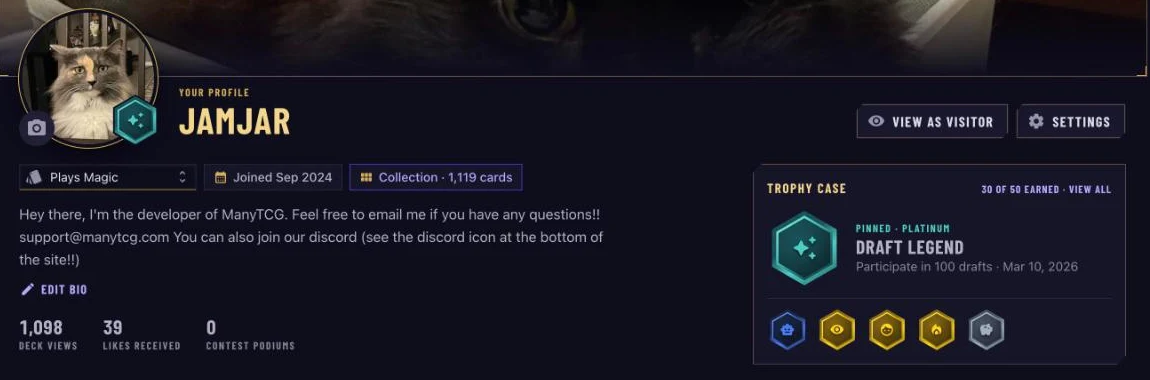
Your profile now has a Trophy case next to your stats. It shows your pinned badge up front (or your best one, if nothing is pinned), the next few highlights, and your total earned. Click View all to open the full Badges tab.
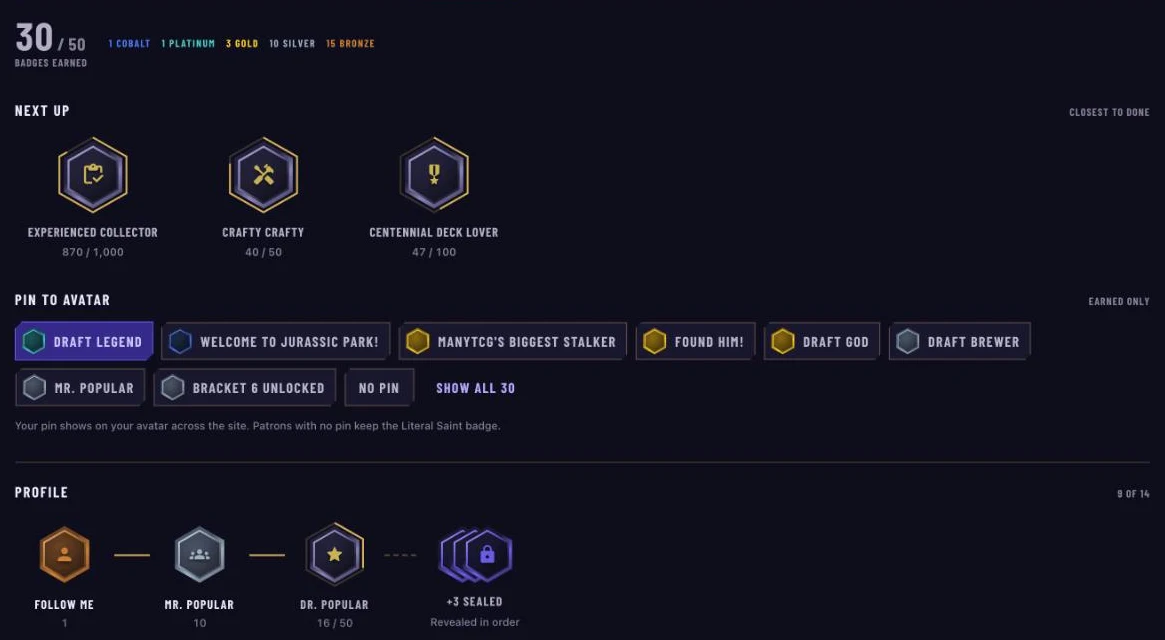
On the Badges tab you'll see:
- Badges earned: your count and how many of each metal you hold.
- Next up: the three badges you're closest to finishing (only you see this on your profile).
- Every shelf, with each chain showing what you've earned, the step you're working on, and what's still sealed.
Click any medal to lift it out for a closer look: its description, your progress, and how rare it is (the percentage of players who have earned it).
Pin Your Favorite Badge
Pin any badge you've earned to your avatar and it travels with you: comments, deck pages, player cards, messages and the site header.
How to Pin a Badge
- Go to your Profile and open the Badges tab.
- Find Pin to avatar. It lists every badge you've earned, best first.
- Click the badge you want.
That's it. To change it, click a different badge. To take it off, choose No pin.

If you're a patron and haven't pinned anything, your Literal Saint badge shows automatically. You've earned it.
Start Earning
You've probably earned a few badges already without knowing it. Open your profile and check your Badges tab. Signed in, the home page also shows Badges within reach, the ones you're closest to, each with a shortcut to the thing that earns it. You'll get a notification every time a new medal lands.
Build decks. Draft cards. Grow your collection. Join the community. Every action brings you closer to your next badge.
Happy collecting.
The ManyTCG Team